If you’ve ever stared at your device’s storage bar turning red right as you try to install a new gacha game, you know how frustrating it is to get blocked from playing before you even start. For anyone prepping to jump into HoYoverse’s turn-based space fantasy hit, the first practical question to answer is how many gigs is Honkai Star Rail, and whether your phone, PC, or console has enough space left to run it smoothly. I’ve lost count of how many times I’ve had to delete old games or offload unused apps just to make room for a new version update, so I’ve pulled together all the latest, up-to-date storage numbers to save you the headache of last-minute file purges.
How Many Gigs Is Honkai Star Rail Across All Devices?
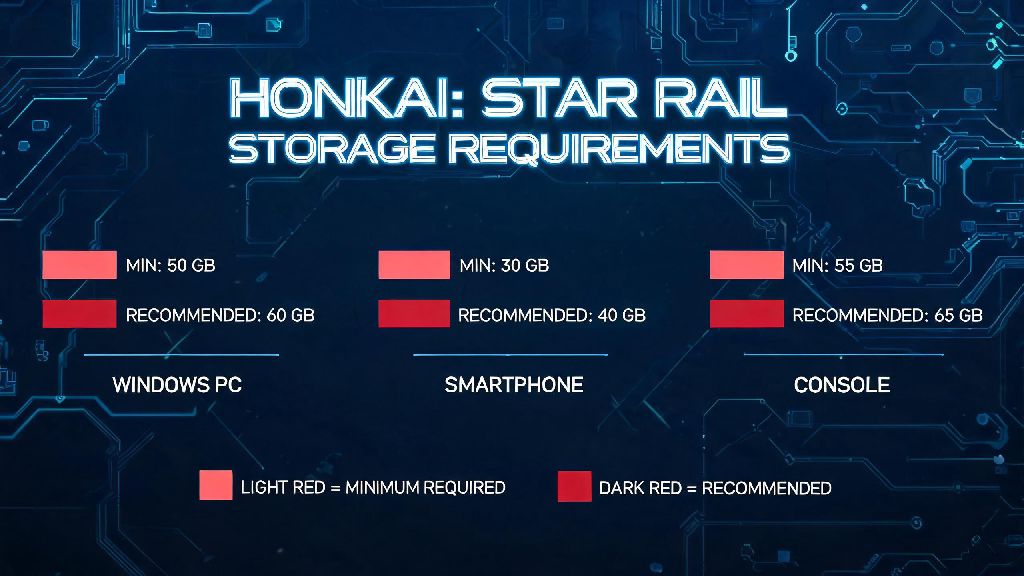
First, let’s break down the current required and recommended storage sizes for every supported device, as of the latest version. For Windows PC, the minimum required storage is 20 GB, but the recommended size to avoid performance issues during updates is 30 GB. That extra 10 GB of headroom is non-negotiable if you don’t want to deal with corrupted update files, which I’ve had happen twice when I only had 2 GB of free space left before installing a patch. If you’ve been searching for how many gigs is Honkai Star Rail because you’re switching from mobile to PC, you’ll be happy to know that your account progress transfers cross-platform, so you won’t lose any of your characters or items when you re-download.
For mobile users, the numbers vary a bit between iOS and Android, but you can expect a base install size of around 15 GB for both operating systems. Again, you’ll want to leave at least 10 GB of extra free space on your phone if you plan to play long-term, since regular version updates can add 2 to 5 GB of content every six weeks. iOS users might see a slightly larger initial install size because of extra app optimization files, but the difference is usually less than 1 GB.
If you’re playing on PlayStation 5, the base install size is roughly 25 GB, with 10 GB of recommended extra space for updates. HoYoverse hasn’t released an official Xbox version yet, but if that launches in the future, we expect the storage size to be comparable to the PS5 version. Don’t forget that if you opt to download high-definition voice packs for multiple languages, you can add an extra 2 to 4 GB to any of these totals, so keep that in mind if you prefer Japanese or Korean voice lines over the default English dub.
What Contributes to Honkai Star Rail's Large File Size?
Many new players are surprised that a turn-based gacha game takes up more space than some big-budget AAA console titles, but there are a few clear reasons for the large file size. First, HoYoverse adds entire new playable regions every few versions, each with their own open-world maps, cutscenes, character voice lines, and soundtracks. The Penacony update alone added almost 4 GB of new content when it launched, for example. When you’re wondering how many gigs is Honkai Star Rail takes up on your device, don’t forget to account for those extra cached files that build up over time.
Another big factor is the game’s high-quality art assets. Every character has multiple animated skills, idle animations, and voice lines for battle, open-world exploration, and character story quests, and all of those files add up fast. High-resolution texture packs for PC and next-gen consoles also contribute to the larger size, as they’re designed to look sharp on 4K displays without blurring or pixelation.
You also have to account for cached data that builds up as you play. The game stores temporary files for frequently accessed content, like character models for your most used units or map data for regions you visit often, to cut down on loading times. That cached data can add an extra 1 to 3 GB of storage usage over time, even if you never install another update.
Easy Ways to Reduce Honkai Star Rail Storage Usage
If you’re running low on storage but don’t want to uninstall Honkai Star Rail to make room for other apps, there are a few simple fixes you can try to cut down the total file size without breaking your game or losing your progress. I’ve tested all of these methods myself, and none of them caused any issues with my account or saved data, as long as you follow the steps correctly. If you’re still not sure how many gigs is Honkai Star Rail after trying these tips, you can check the exact file size for your installation in your device’s app or storage settings menu.
One important thing to note is that you should never delete individual game files manually from your device’s file manager, even if you think they’re unused. That can corrupt your game installation, and you’ll have to re-download the entire thing to fix it. Always use the in-game menus or your device’s official app management tools to modify game files.
I also recommend holding off on downloading optional content packs, like character story previews or event cutscene replays, if you’re really tight on space. You can always stream those cutscenes online later if you want to watch them, and skipping the download saves you a few hundred MB of extra storage.
What to Expect for Future Storage Size Increases
It’s no secret that Honkai Star Rail’s file size will only get bigger as HoYoverse adds more content to the game over the coming years. Based on past update trends, you can expect the base install size to grow by roughly 8 to 12 GB per year, as the team adds 4 to 6 new major version updates annually, each with new regions, characters, and story content. That means if you’re planning to play for multiple years, you’ll need to plan for extra storage space down the line.
For PC users, adding an extra 1 TB solid state drive is a relatively cheap upgrade that will give you more than enough space for Honkai Star Rail and all your other games for years to come. For mobile users, opting for a phone with at least 256 GB of internal storage is worth the extra cost if you play a lot of gacha games, since most new phones don’t support expandable microSD storage anymore. If you play on PS5, you can easily move the game to an external USB drive if your internal storage fills up, which is a quick, low-effort fix.
HoYoverse has also hinted that they’re working on optional asset compression tools for future versions, which would let players download lower-resolution versions of less frequently used content to save space. We don’t have an official release date for that feature yet, but it’s a promising sign that the devs are aware of storage concerns for players with smaller device capacities.
At the end of the day, exactly how many gigs is Honkai Star Rail will depend on what platform you play on, what language packs you install, and how long you’ve been playing without a fresh reinstall. The good news is that even if you’re tight on space right now, the simple tips we covered can help you free up enough room to keep playing without having to delete other apps or games you love. Just remember to always leave a few extra GB of free space before installing a new update, and you won’t have to deal with the frustration of failed installs or corrupted game files.