I recently switched to a new mid-range Android phone and spent 20 minutes deleting old apps and photos just to install my favorite turn-based RPG. I’d forgotten to check how large is Honkai Star Rail for mobile, and I almost gave up and skipped the download entirely. If you’re short on device space or planning to install the game for the first time, this guide breaks down exactly what you can expect for file sizes across every platform, plus actionable tricks to cut down on bloat.
How Large Is Honkai Star Rail Across Major Platforms?
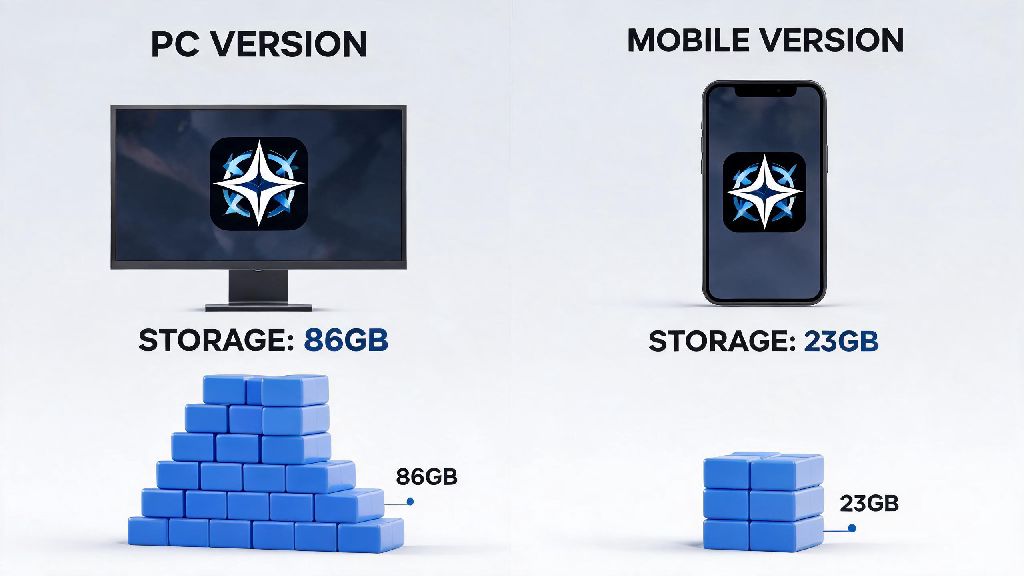
As of the latest version update, the base installation size varies a lot depending on what device you use, and whether you download extra assets like additional voice packs or high-definition textures. PC full installation size (including all voice packs and latest updates) sits at roughly 86 GB for most users, though you can cut that down to 75 GB if you only keep one voice language installed. Mobile sizes are far smaller, with Android requiring 23 GB for a full base install and iOS coming in at 25 GB for the same set of assets. PS5 users will get a slightly compressed installation file that clocks in at 79 GB, as Sony’s system uses native compression for all downloaded game files. You’ll notice these numbers go up every few weeks, as HoYoverse releases regular content patches that add new maps, characters, and story content to the game.
Key Factors That Increase Honkai Star Rail’s File Size Over Time
It’s not unusual to see your Honkai Star Rail install grow by 10 to 15 GB over a year of regular play, even if you don’t download any optional assets on purpose. A lot of hidden files build up over time that most players don’t even know exist. The most common causes of growing file size include:
You don’t have to keep unused voice packs installed if you only play with one language, and that’s one of the fastest ways to free up space without impacting your gameplay experience at all. A lot of players download extra voice packs out of curiosity early on and forget to delete them later, wasting multiple gigabytes of space for no reason.
Pro Tips To Reduce Honkai Star Rail’s Storage Footprint
You don’t have to delete your entire game library just to make room for the next HSR update. I’ve tested every possible trick to cut down on file size over the past two years of playing, and none of these methods will impact your saved progress or force you to redownload core game assets. First, head to your in-game settings, go to the language tab, and uninstall any voice packs you don’t actively use. This can free up 3 to 9 GB of space in less than a minute, with zero downsides if you only listen to one voice language. Clearing the game cache will not delete your saved progress or any permanent game assets, so you can hit that button in the settings menu every few months to get rid of old temporary event files, freeing up another 1 to 3 GB. Low-end PC and mobile users can turn off the optional high-definition texture pack from the graphics settings to cut an extra 3 to 5 GB off the install size, with barely noticeable visual differences on smaller screens. If you’ve been playing the game for more than a year, you might even find that uninstalling and reinstalling the game entirely cuts 5 to 10 GB off the total size, as old unused assets from past events are not automatically removed during regular updates. I did this before the 2.0 update last year and freed up 11 GB on my PC without losing any of my progress or saved settings.
Minimum and Recommended Device Storage Requirements For HSR
A common mistake new players make is only leaving exactly enough space for the listed install size, then running into errors when they try to download the first major update. Downloading and installing patches requires extra temporary space to unpack and install new files, so you’ll need to leave extra room on your device to avoid issues. For Android users, you should have at least 30 GB of free space before you start downloading the game, and 40 GB of free space if you plan to play long-term. iOS users need a minimum of 32 GB of free space, with 45 GB recommended for regular players who don’t want to delete other apps every time an update drops. PC players should reserve at least 100 GB of free space on their drive, with 120 GB recommended if you want to keep all voice packs and high-definition textures installed. PS5 users only need 90 GB of free space for a base install, with 100 GB recommended for long-term play. You should always leave at least 15% extra free space on your device above the listed game size to avoid update failures, corrupted files, or unexpected performance issues during play. I learned this the hard way when I tried to install the 1.6 update on my old phone with only 1 GB of extra space left, and ended up having to redownload the entire game because the installation got corrupted halfway through.
At the end of the day, the exact answer to how large is Honkai Star Rail depends on your platform, what optional assets you download, and how long you’ve been playing the game without clearing out old files. With the simple tricks we’ve covered, you can easily cut 5 to 15 GB off the total install size without making any sacrifices to your gameplay experience. You won’t have to delete your favorite apps or old photos just to keep up with the latest content updates anymore.